
The Invisible Weight in Every API Response
In the 1850s, telegraph operators stripped messages to their skeleton — paying by the letter taught a discipline that modern developers rediscovered a century and a half later.

Your formatted JSON is carrying whitespace it doesn’t need. A free tool handles the compression, the cleanup, and the sorting — in one place.
The Invisible Weight in Every API Response
In the 1850s, telegraph operators stripped messages to their skeleton — paying by the letter taught a discipline that modern developers rediscovered a century and a half later. Your formatted JSON is carrying whitespace it doesn’t need. A free tool handles the compression, the cleanup, and the sorting — in one place.
✦ Transparency note: This article was written by AI and reviewed by the author. All factual claims were independently verified (with another prompt) before publication. Mistakes may still happen.
Disclaimer: The information in this post is for educational and informational purposes only. It does not constitute financial, legal, or professional advice. The author is not liable for any financial loss or damages arising from use of this information. Data, pricing, and availability referenced here may be out of date — always verify independently before acting on it.
The People Who Paid by the Letter ✉️
Imagine you are paying by the character.
Not metaphorically. Actually, literally — every word you transmit costs real money. That was the reality of commercial telegraphy in the 1850s. Sending a message across an ocean cable meant paying per word. The result was a professional discipline that looks, from a distance, remarkably like modern data engineering.
Skilled telegraph operators became compression artists. They stripped messages to their skeleton. Prepositions went first, then articles, then anything that could be implied from context. “Am arriving Tuesday evening, please arrange accommodation at a hotel near the station” became “TUE EVE NEED ROOM NEAR STN.” The compression ratio was often 50% or more. Not because the operators were lazy — because every unnecessary character was money wasted by someone else.
The machines receiving those messages didn’t care about grammar. They didn’t need full sentences. They just needed the facts — the signal without the noise. 😮
Now open the network tab on any web browser and look at the JSON coming back from an API request. That beautifully indented, four-spaces-per-level, human-readable response — it is carrying dead weight. Spaces, newlines, indentation characters: none of it means anything to the machine parsing it. Every JSON parser ever written ignores whitespace between tokens. Every single byte of formatting is there for you. And on a high-traffic API serving a million requests a day, “for you” adds up to real bandwidth costs that somebody, somewhere, is paying.
The Victorian telegraph operator would have had opinions about this.
What JSON Actually Is — and Why Formatting Exists at All 🔬
Before talking about minifying it, it is worth pausing on what JSON actually is — because it is one of those tools so ubiquitous that most people use it daily without ever thinking about its origin.
JSON stands for JavaScript Object Notation. Douglas Crockford, an American software engineer, formalized and popularised the format in the early 2000s as a lightweight alternative to XML — the angle-bracket-heavy format that dominated data interchange at the time. The JSON specification takes just a few pages. Crockford’s original description of JSON was published at json.org and deliberately kept minimal: the whole grammar fits on a single page. It has been unchanged since.
XML was expressive and powerful, but verbose. A simple key-value pair that takes 13 characters in JSON could take 60 in XML, with opening tags, closing tags, and namespace declarations. For the web, where bandwidth and parse speed mattered, JSON won. 🎯
The format itself is built from exactly six value types. Everything in every JSON file you have ever seen is a combination of these:
string — text in double quotes.
"hello world". Single quotes are invalid JSON — a common mistake.number — integers, decimals, negatives.
42,3.14,-7. No BigInt, NaN, or Infinity — those are JavaScript concepts that the JSON spec explicitly excludes.boolean —
trueorfalse. Lowercase only.TrueandFalseare invalid.null — absence of value. Lowercase only. Often a warning sign when present in large quantities.
array — an ordered list in square brackets. Any mix of types allowed. Trailing commas are not allowed — another common mistake.
object — key-value pairs in curly braces. Keys must be strings in double quotes. Key order is technically unspecified by the spec.
That’s the whole language. Its simplicity is the reason it became universal — every programming language parses it, every API speaks it, every config file on your machine is probably one.
And here is the key insight that makes this tool interesting: a minified JSON file and a formatted JSON file contain exactly the same data. Not “mostly the same.” The parser sees identical content. The whitespace between tokens is invisible to it. So “format” and “minify” produce semantically identical documents. One is for humans; one is for machines.
The Format Wars: XML, JSON, and Who Won 🏆
To appreciate why JSON became the lingua franca of the web, it helps to understand what it replaced.
XML (eXtensible Markup Language) was standardised by the W3C in 1998. It was designed to be flexible, expressive, and self-describing — a document format that could represent almost anything. It succeeded at all three, but at a cost. Verbose syntax. Namespace rules. Mandatory closing tags. Two ways to express an attribute (element text or tag attribute). A separate schema language. An ecosystem of related specifications that took years to learn properly.
For developer tools and enterprise software, XML still dominates certain domains. But for web APIs, it was too heavy. Early REST APIs in the mid-2000s often offered both XML and JSON responses. By the early 2010s, most new APIs were JSON-only, and “JSON API” had become the default assumption. The verbosity battle was over.
The irony is that JSON “won” partly by being under-specified. The key-order problem — the JSON spec says object key order is unspecified, so parsers are not required to preserve it — is a consequence of that minimalism. Two JSON responses with identical data but different key ordering are semantically identical to a parser but look completely different in a plain-text diff. This is exactly the problem the Sort Keys feature solves. 😮
The Tool: JSON Minifier & Formatter ⚙️
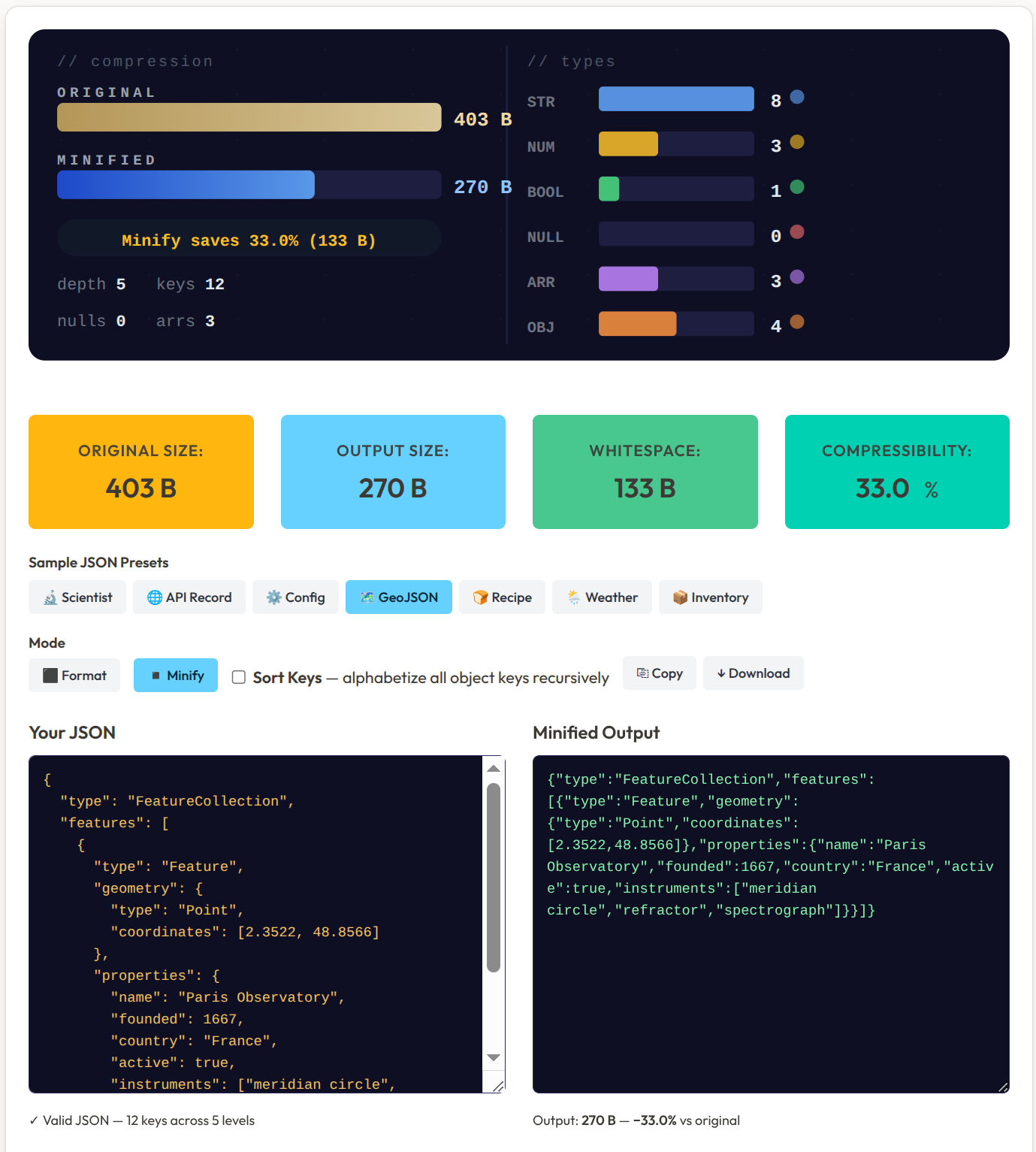
This tool does three things that are each genuinely useful on their own, and more useful together:
Format — takes minified or messy JSON and spreads it into readable, indented structure. Choose 2 spaces, 4 spaces, or tabs to match your project’s convention. Useful when you’ve just pulled a wall-of-text API response and need to actually read it.
Minify — strips all whitespace and produces the smallest valid JSON string possible. The stat panel reports exactly how many bytes were saved and what percentage of the original file was pure whitespace. Typical well-formatted JSON: 15–30% whitespace. Config files with deep nesting can push higher. 📦
Sort Keys — every object’s keys are alphabetized recursively, all the way down the nesting tree. This is the quiet gem of the feature set. Two API responses with identical data but shuffled key order look completely different in a diff — Sort Keys makes them identical strings. Equality checks, hash comparisons, and code reviews become dramatically cleaner.
The structure report panel shows more than byte counts:
Nesting depth — how many levels deep your JSON goes. Deeply nested structures often signal an API that wasn’t designed with the client in mind.
Total key count — useful for spotting bloated payloads.
Type breakdown — strings, numbers, booleans, nulls, arrays, objects.
Null count — flagged in red. A response with many nulls often means optional fields are being transmitted unconditionally. Somebody is paying bandwidth for fields that contain nothing.
Walking Through It: Five Steps 🛠️
Load the API Record preset. It populates with a fictional user profile containing nested objects, booleans, and four null fields. The stats panel updates immediately — depth, key count, type distribution, null count all visible at once.
Hit Minify. The formatted output collapses to a single line. Watch the byte count shrink in the result cards. On the preset example, roughly 17% of the file was whitespace.
Switch to Format → 4 spaces. It re-expands with the new indentation convention instantly. Toggle to Tabs if that’s your project’s standard. The output updates without reloading anything.
Toggle Sort Keys. Every key alphabetizes recursively. “bio” now comes before “displayName”, “lastSeen” before “posts”. If you ran this on two different API responses for the same user record fetched an hour apart — and the only real change was a counter incrementing — the Sort Keys output would differ in exactly that one field. That’s a meaningful diff instead of a noisy one.
Hit ↓ Download to save the result as output.json. Handy for code reviews, file diffs, or sending a prettified API dump to a colleague. 📐
Pro tip: Sort Keys + Minify + Copy is the fastest way to generate a canonical JSON fingerprint. Two objects with the same data will always produce byte-for-byte identical strings — making deduplication, content-based caching keys, or hash comparisons trivial. 🎯
The Null Problem — What the Stats Panel Reveals 📊
The type breakdown panel is more informative than it looks.
A JSON response full of nulls is a common symptom of a specific API design pattern: returning a fixed schema for every response, regardless of whether the data exists. If a user profile endpoint always returns the same 40 keys — and 18 of them are null because the user hasn’t filled in their optional fields — you are transmitting 18 null values every single time that endpoint is called.
At low traffic, this is invisible. At scale, you are paying for it in bandwidth, in parse time, and in downstream confusion when developers look at a null field and try to figure out whether it means “not set”, “explicitly empty”, “error”, or “deprecated”.
The minifier won’t fix your API design. But the null count in red is a prompt to ask the question: do all of these nulls need to be here?
JSON has six value types. Knowing your data’s shape — seeing the breakdown right there in the panel — is the first step toward designing leaner payloads. 😮
What the Preset Collection Is For 🗺️
The tool ships with seven sample JSON presets, each targeting a realistic use case:
Scientist — nested objects with mixed types; good for testing Sort Keys recursion
API Record — a fictional user profile with booleans and null fields; closest to a real API response
Config — a project configuration file; familiar to anyone who’s worked with
package.jsonor.eslintrcGeoJSON — geographic feature data with arrays of coordinate pairs
Recipe — ingredient and instruction data; demonstrates arrays within objects
Weather — forecast data with numeric measurements; a data-heavy shallow structure
Inventory — product records; demonstrates repeated objects in an array
Each one exercises a different structural pattern. If you’re building something that works with JSON and want to test edge cases — deeply nested keys, large null counts, mixed-type arrays — the presets give you starting points that don’t require building test data from scratch.
Who Is This For? 🎯
Frontend developers who receive minified API responses and want to read them without pasting into a text editor and reformatting manually
Backend developers validating that a config file is clean and consistent before deploying
Anyone debugging an API integration who needs to see the payload structure clearly
Developers doing code reviews who want to diff two JSON responses meaningfully — Sort Keys makes that possible
Anyone who has ever copy-pasted a JSON blob into a PR or Slack message and thought “this is unreadable”
The tool runs entirely in the browser. No server, no account, no data upload. Paste, process, copy. 📦
For broader reading on JSON APIs and web development patterns:
→ Browse JSON & API programming books on Amazon
Affiliate disclosure: This post contains Amazon affiliate links. I may earn a small commission at no extra cost to you.
The Reframe: Formatting Is a Choice About Audience 💡
Here is the thought worth sitting with.
A formatted JSON file and a minified JSON file are the same document. They contain the same information. They mean the same thing to every parser that reads them. The only difference is who they are optimised for.
Formatted JSON is for the human. It is the version you write while building, debugging, and reviewing. Every indent, every newline, every space is there to help you hold the structure in your head. It is a communication tool.
Minified JSON is for the machine. It is the version that goes out over the wire, into cache, into the response payload. Every unnecessary character is overhead — a letter the Victorian telegraph operator would have stripped out without hesitating.
Most workflows treat these as separate concerns handled at different points. This tool makes the conversion instant — from one to the other and back, with Sort Keys as the bridge that makes them truly interchangeable for comparison purposes. 😮
The telegraph operators understood that the message and the transmission are two different things. The message is for the reader. The transmission is for the wire. Good data engineering has always been about knowing which one you’re building at any given moment.
If you enjoy this kind of precision-tool thinking applied to everyday processes, Your Kitchen Is Not the Same Kitchen Twice explores the same instinct applied to sourdough fermentation — a different domain, the same satisfaction of understanding what’s actually happening inside a system.
🐾 Division of Payload Reduction and Strategic Null Elimination
Incident Log — Reference: Suspicious Byte Count Anomaly, 14:37 UTC
i have been stationed at the workstation since approximately 14:00 for reasons that are entirely professional and not related to the laptop being warm.
the human pasted a JSON response into the tool. i assessed it from my position on the desk. 1,840 bytes. the stats panel indicated 31 nulls, a nesting depth of 6, and a key count of 74. i placed one paw on the screen to confirm these numbers. the screen reacted unexpectedly. some inputs changed. i have filed this under “interface sensitivity requiring further investigation.” 🐾
the human hit Minify. 1,247 bytes. i watched the bar shrink. i felt this was a satisfying outcome and communicated this with a slow blink.
the Sort Keys toggle was engaged. i observed the key names rearranging themselves alphabetically. “bio” moved before “displayName.” “lastSeen” moved before “posts.” i approved of this. alphabetical order is one of the few human organizational systems i find acceptable, the others being “warmest surface first” and “widest sunbeam takes priority.”
the 31 null fields were visible in red in the stats panel. i studied them at length. one null field is named “preferredTreatFrequency”. its value is null. i consider this a serious data quality issue and have escalated it to the appropriate department, which is me.
i pressed Download. a file named output.json appeared on the machine. i investigated the download folder with my nose. it smelled like nothing, which i found mildly disappointing but professionally acceptable.
the final payload: 891 bytes. a 51.6% reduction. i also knocked a pen off the desk during the debrief. the pen was not mission-critical. i have confirmed this.
brrp.
— Senior Analyst Brackets, Division of Payload Reduction and Strategic Null Elimination “If the data is clean, the bytes are smaller. If the bytes are smaller, the mug warms faster. The logic is sound.”
References
Ecma International — ECMA-404: The JSON Data Interchange Standard (open standard, public domain)
Douglas Crockford — Introducing JSON (original specification and history)
JSON — Wikipedia (format history, comparison with XML, specification notes)
XML — Wikipedia (W3C standardisation 1998, comparison context)
Your Kitchen Is Not the Same Kitchen Twice — riatto.substack.com (companion post — precision tools and data-driven methods)
Wrapping Up 🎯
Douglas Crockford didn’t invent the idea that data should be stripped to its essentials. He just gave it a clean syntax and posted the spec online. The Victorian telegraph operator, the developer trimming API payloads, the engineer running Sort Keys before a diff — they are all doing the same thing: separating the message from the noise.
The JSON Minifier & Formatter doesn’t fix your data. It shows you what your data looks like when the decoration is removed. Sometimes that’s all you need to see what shouldn’t be there.
→ Try it on riatto.ovh — free, no account, runs in your browser
Useful? Spotted something to fix? Leave a comment below.
→ Browse JSON & API programming books on Amazon
Affiliate disclosure: This post contains Amazon affiliate links. I may earn a small commission at no extra cost to you.
About this article This post was written by AI and reviewed by the author. All factual claims were verified (with another prompt) at the time of publication. Final perspective, editorial judgement, and any opinions expressed are the author’s own.
Published on riatto.substack.com · March 2026