
Nginx Easy Guide: Setup And Configure A Web Server
Deploying a high performance and stable web server

The situation - One or more local sites or apps ready for deployment
You developed a dynamic web app locally or have a local blog site or website e.g. Streamlit Python app. Now you want to deploy it in the internet. But hosting sites like Hostinger and Netlify are for static sites like blogs or personal websites.
Dynamic sites that run python or similar usually require a cloud or VPS to run a web server to serve your applications or sites.
One of the most popular web servers is Nginx. Web servers can serve different types of websites, dynamic or static. So basically, having a web server means that you can serve up different sites by mapping different ports to different domain names.
The problem with this approach is that setting up or configuring a server and a web server are usually not easy affairs. Searching the internet for just the relevant information is not an easy task when you overwhelmed with all sorts of information.
I hope the below solution which I searched and spent some days will help good site owners shave some time off this process. Actually it is not too challenging, nor the installation configuration too lengthy, you just need the right information.
Solution: Get a Linux cloud server and Nginx web server ready
Setup and use a server. You will need to learn some common server commands but it should not too challenging if you have some command line experience. I would recommend the affordable Hetzner cloud server base plan to start with. Go with the Debian Linux server.
Linux administration goes beyond the coverage of this post but here is a short Youtube basic Linux commands video tutorial if you will. Or Basic Linux terminal commands and server administration post.
As for Nginx, here is the best video guide I found - it is the easiest and clearest setup walkthrough. This is important because there are way too many difficult or irrelevant guides around that are useless to beginners in my opinion.
What next: Optional but recommended - Cloudflare
Now you have setup your Nginx web server to serve up requests to your domain name, you may may want to use Cloudflare and their SSL instead and configure to update the Nginx SSL settings.
Of course, you can continue your own SSL settings from the previous video and still connect with Cloudflare as well.
To setup Cloudflare SSL with Nginx, point your nameservers from your domain registrar to Cloudflare as instructed.
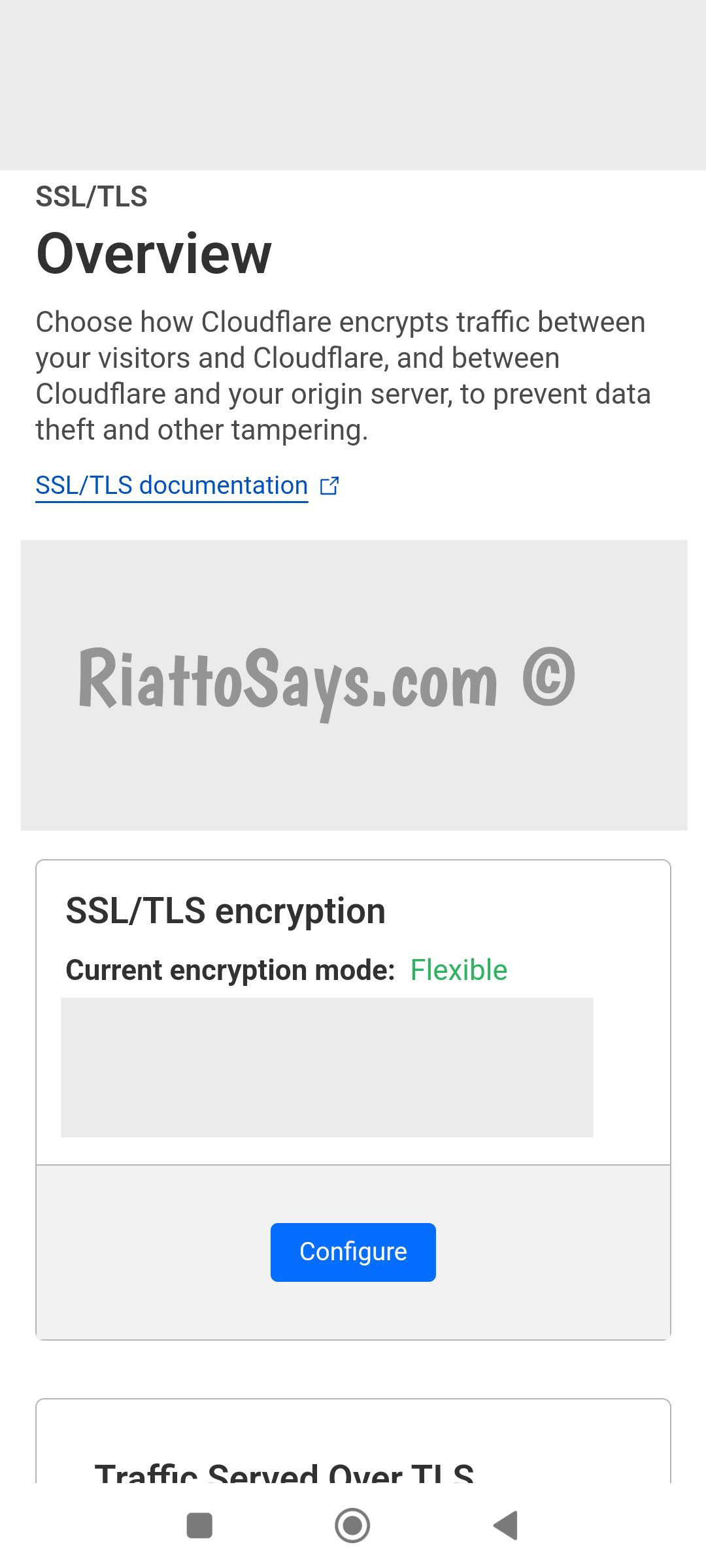
Here is the Cloudflare SSL configuration that will work for the above Nginx setting. You need to set the Cloudflare SSL settings to flexible.
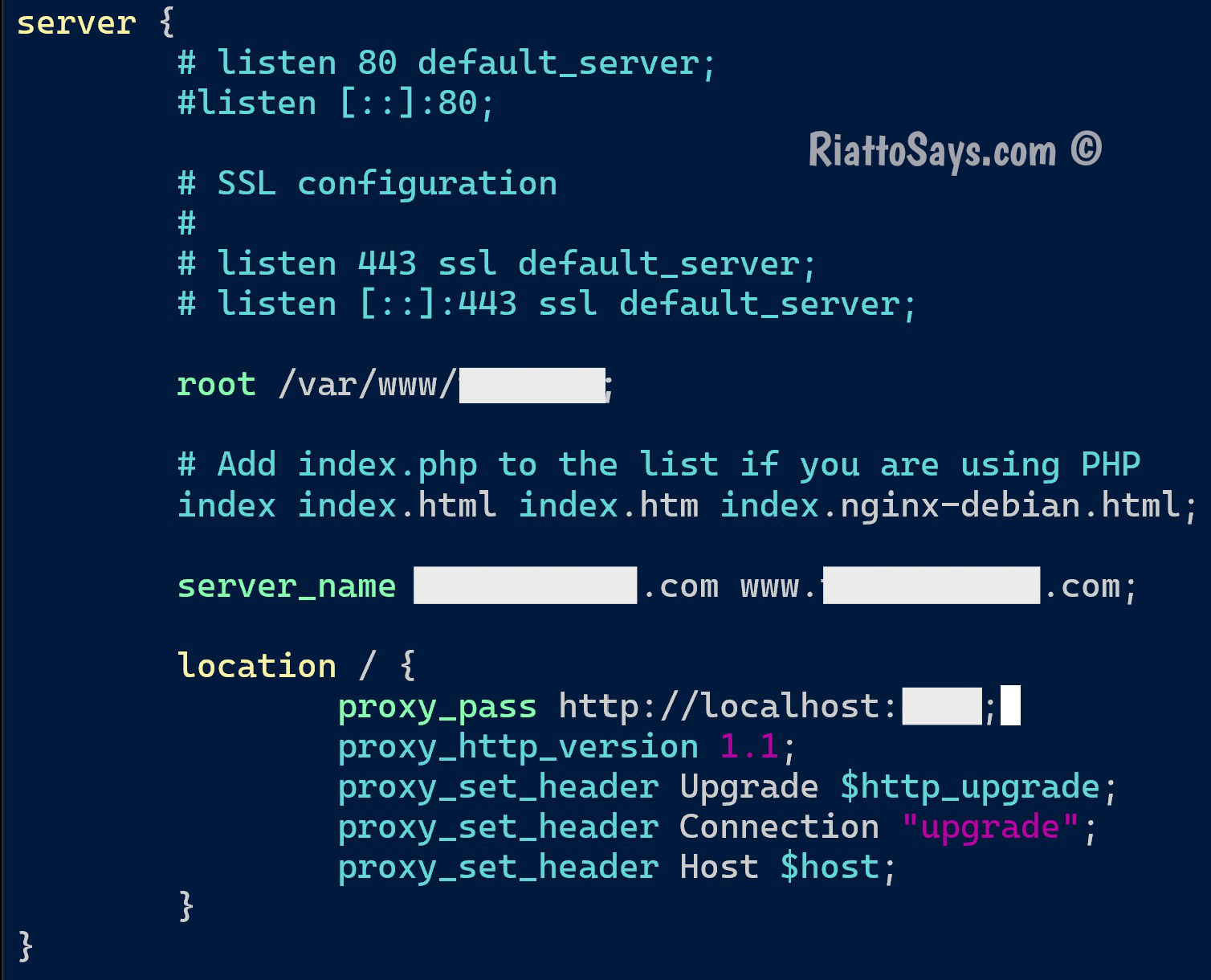
A basic example of the Nginx web server configuration will look something like this. Note that SSL configurations are turned off.
Cloudflare will help to secure your servers, but you can take further steps to secure your Linux server.
What if I do not want any hosting hassles and just want to deploy my Python app via Github easily?
I recommend Render. For just a reasonable few bucks more per month, they take care of your dynamic server needs with professional reliable hosting-related support. To deploy your latest changes, usually you just need to git push to your connected repository. They also have a free plan for you to test it out.
Or you can remember Render as your backup if your own server does not work out.
If you are new to Github, this post may help with the bare basics.
Are there any free professional hosting sites that can deploy Python web apps?
I have not tested these but they should work.
Summary
The above Nginx tutorial will work for both personal and commercial sites, dynamic and static, or any general web frameworks including python and JavaScript based.
The limitations mainly being your server hardware or cloud plan as far as I know. Connect to Cloudflare for more benefits like Security.
Hetzner - Debian - Nginx - Cloudflare
Update: I found Nginx can also be deployed on Railway (free) though I have not tested that.
Or deploy with Render if you do not want to setup and administer a server yourself i.e. skip Nginx web server and so on (but still connect to Cloudflare if you want).
Read on for more ideas below.
I would recommend going with reputable hosting providers and software, it is your legit content or site invested with your hard work after all. Play safe.
Now, go deploy some cool wholesome sites that serve humanity better.
(‾◡◝)
More
What are some reliable free static hosting providers?
Netlify and GitHub pages (public repository) are established companies that provide free static hosting as well.
Is there an affordable paid static hosting sites that support GitHub also?
Hostinger is pretty decent in terms of pricing and service. Under Advanced, there is an option to setup GitHub repository, and even automatic pulls or updates with webhook.
Hostinger can assign a random subdomain for your free testing. You may connect to a custom domain then or delete the uploaded files or the setup altogether.
Is there anywhere to deploy a JavaScript dynamic site for free?
Vercel can do that but the free plan is for personal sites. The other is Netlify, their free plan also has their monthly but acceptable limits.
How to edit files on Linux?
Read about Vim related posts here. The other that may work from the Linux terminal is nano.